 Storix
Help / Transfers and sync
Resolving conflicts
When a file changed both on this computer and on the remote storage, Storix stops and lets you choose. Nothing is overwritten until you do.
When you'll see it
The Resolve conflict window opens during a sync when:
- a file changed on both sides since the last sync,
- a file exists on both sides the first time you sync and the copies differ,
- a file was deleted on one side and your deletion rule says to ask.
The window doesn't block the rest of Storix, and the same file never gets two windows. If you set a rule for two-sided changes, matching files are handled by the rule and don't ask.
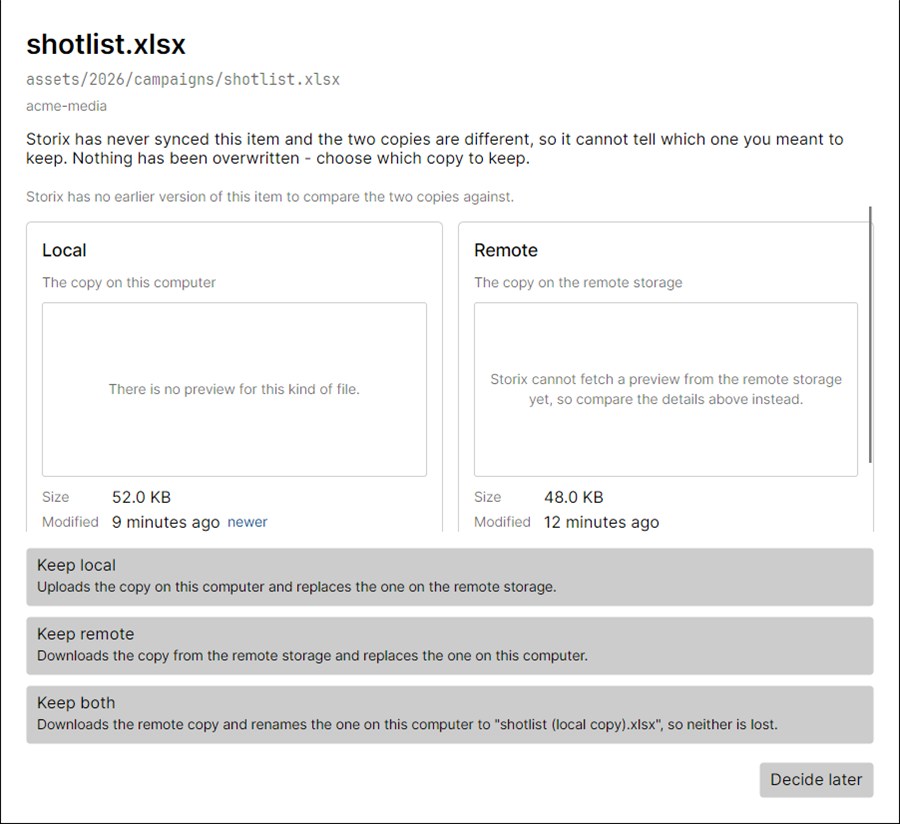
Read the window
- The file name, its path and the Connection are at the top, with a sentence explaining why Storix is asking.
- Two panels compare the Local copy (on this computer) and the Remote copy: size, when each was modified, and newer beside the more recent one.
- Each panel says whether that copy changed, is unchanged or was deleted since the last sync.
- For images on this computer, a thumbnail is shown. Other files show no preview, so compare the size and dates.
Choose what to keep
| Keep local | Uploads your copy and replaces the remote one. |
|---|---|
| Keep remote | Downloads the remote copy and replaces yours. |
| Keep both | Downloads the remote copy and renames yours, for example report.pdf becomes report (local copy).pdf (or the next free name). The remote file isn't touched, and nothing changes if the download fails. |
| Decide later | Changes nothing. Closing the window or pressing Esc does the same. |
The conflict window is the confirmation: there's no second "are you sure" step. Keep local and Keep remote replace the other copy. Choose Keep both if you're unsure.
A copy that has been deleted can't be chosen here, and Keep both needs both copies to exist. If you meant to delete the file, delete the remaining copy yourself.
Conflicts you postponed
There's no separate list of open conflicts. A conflict you postponed is asked about again at the next sync, whether automatic or Sync now. Every conflict is recorded in the Activity log under Sync conflicts, and a related transfer shows as Conflicted in the Transfer Queue's Failed tab.
Fewer conflicts
- Sync more often (Check for changes in Settings → Sync), so both sides change less between syncs.
- If you always want the same outcome, set When a file changed on both sides to a rule such as Keep the newer copy or Keep both copies.
- Leave out files that change on their own, such as lock and temporary files, with sync filters.