 Storix
v1.0 / Windows · macOS · Linux / iOS · Android soon
Every bucket, server and drive in one window.
Storix is a desktop file manager for cloud storage. Connect S3, Azure Blob, Google Cloud Storage, SFTP, FTP and your cloud drives side by side, and move files between them with one transfer queue that doesn't lose work when your laptop does.
No Storix account. Telemetry off unless you turn it on.
Storix for iPhone, iPad and Android.
Mobile apps are on the way, with cross-device sync: your Workspaces and Connections follow you from your desktop to your phone, so the same buckets, servers and drives are there wherever you pick up.
iOSAndroid
Talks to the storage you already pay for.
Add as many Connections as you need, including several accounts on the same provider, and group them into Workspaces per client or project. Each one is browsed the same way, so you stop switching between five consoles and three CLIs.
Object storage
- S3Amazon S3multipart
- S3Wasabi, Backblaze B2, MinIO, DigitalOcean SpacesS3 API
- AZAzure Blob Storageblock blobs
- GCGoogle Cloud Storageresumable
Servers
- SFTPSFTPkey or password
- FTPFTP and FTPSexplicit / implicit
- SSHSSH terminals and tunnelslocal · remote · SOCKS
Cloud drives
- GDGoogle DriveOAuth
- DBDropboxOAuth
- ODOneDriveOAuth
Built for the days things go wrong.
Moving files is easy when the network is good and nobody else is editing. Storix is designed around the other days.
A transfer queue that survives a crash.
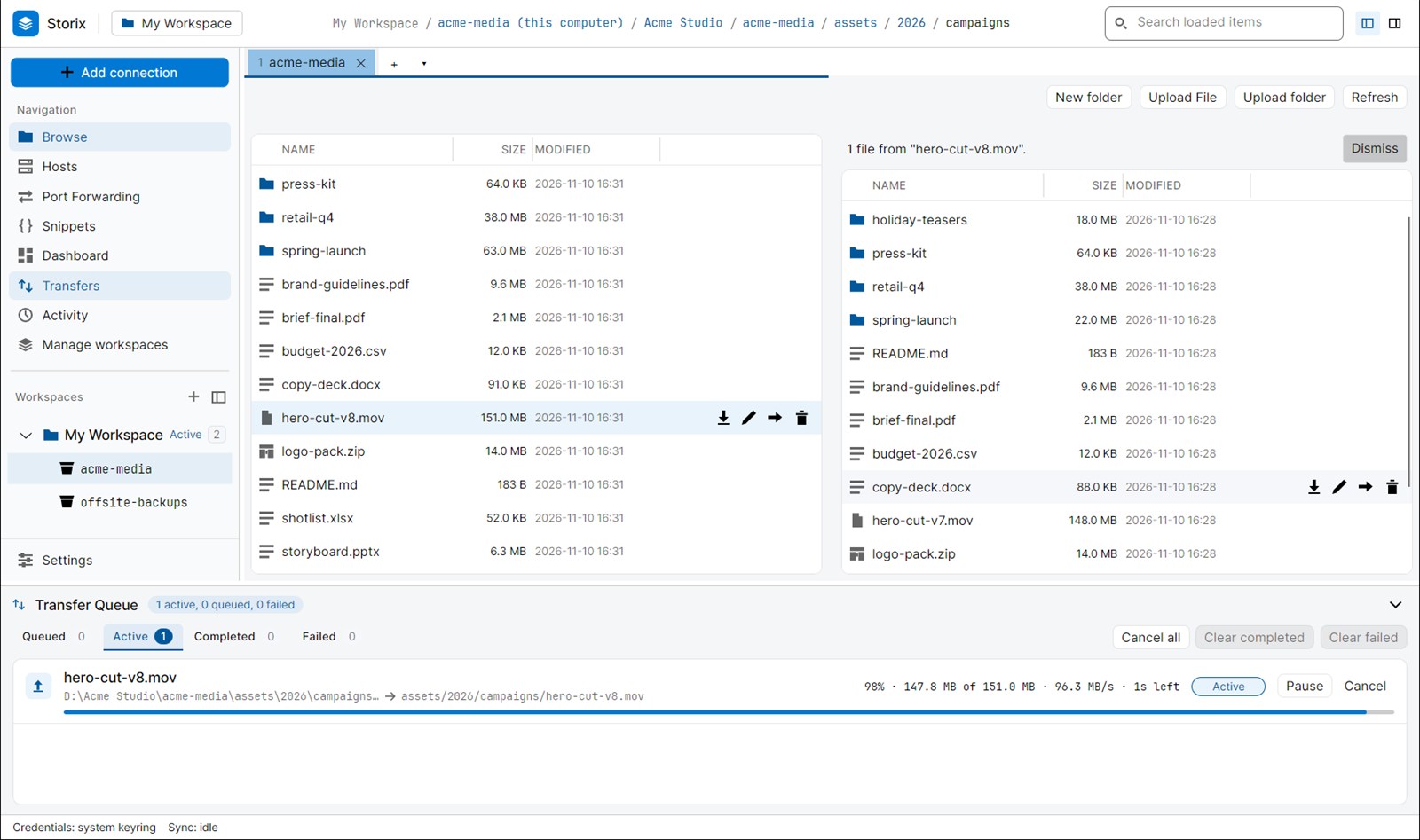
Every upload, download, move and delete goes through one queue that is written to disk on each change of state. Close the lid, lose Wi-Fi or kill the process: when Storix comes back, interrupted transfers resume or re-queue. Nothing is dropped quietly. If something fails, it stays in the queue marked Failed until you retry or dismiss it.
- 10 GB+Files stream in chunks, so size isn't limited by memory.
- OfflineWork done offline waits in the queue and retries with backoff.
- ControlsPause, resume or cancel per file, and cap the bandwidth.
Conflicts are your call.
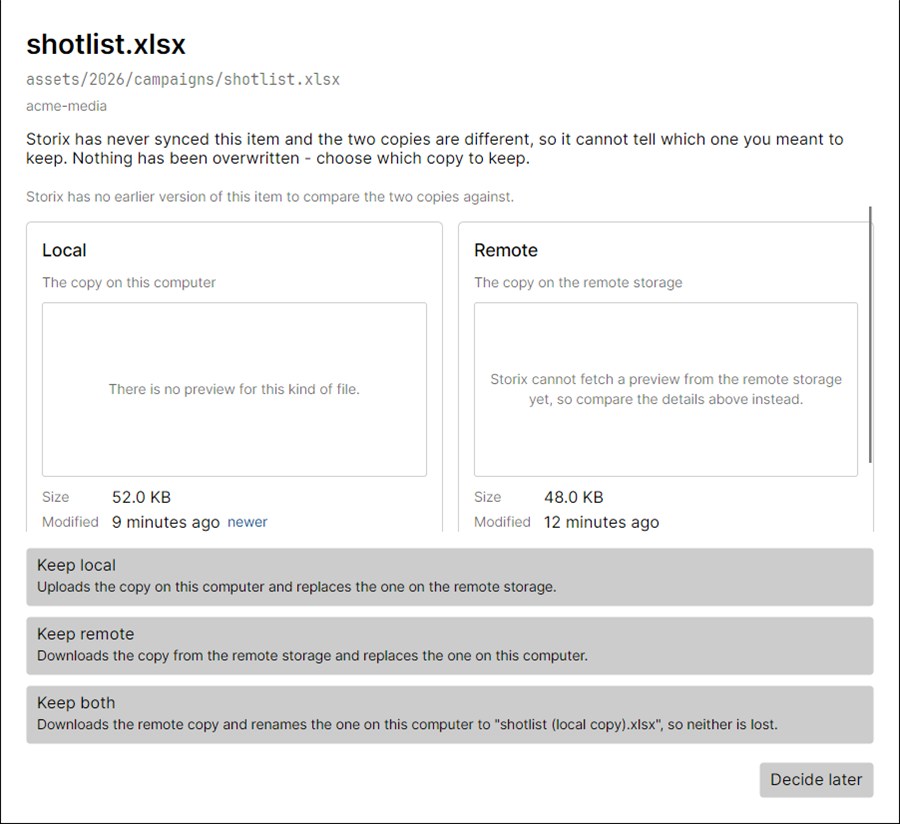
When a file changed on your machine and on the server since the last sync, Storix stops and shows you both sides: size, modified time and, where it can, a preview. You choose to keep local, keep remote or keep both, or decide later. "Keep both" renames your copy, for example shotlist (local copy).xlsx, so nothing is lost. There is no silent auto-merge unless you set a rule for it.
Big buckets stay scrollable.
Listings load page by page and render only the rows on screen, so a prefix with a hundred thousand objects opens without freezing the window. Folder metadata is cached locally and refreshed when you ask, which means going back to a folder you've seen is close to instant.
The tools around the files.
The sidebar takes you from browsing to your hosts, tunnels, saved commands and the activity log, all in one window.
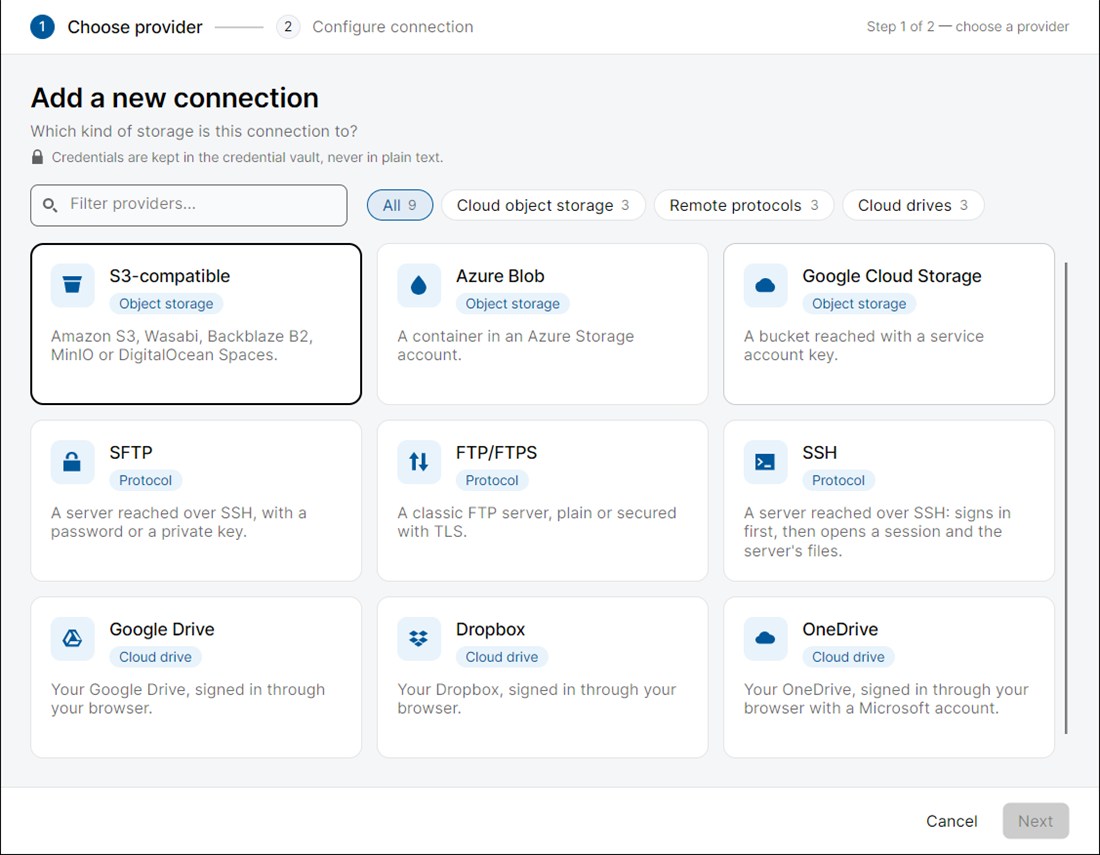
Nine kinds of storage, one setup screen.
Pick a provider, fill in what it needs, and press Test connection before you save. If it fails, Storix says whether it was the sign-in, the network or a permission.
- ObjectS3 and S3-compatible, Azure Blob, Google Cloud Storage
- ProtocolSFTP, FTP/FTPS, SSH
- DrivesGoogle Drive, Dropbox, OneDrive
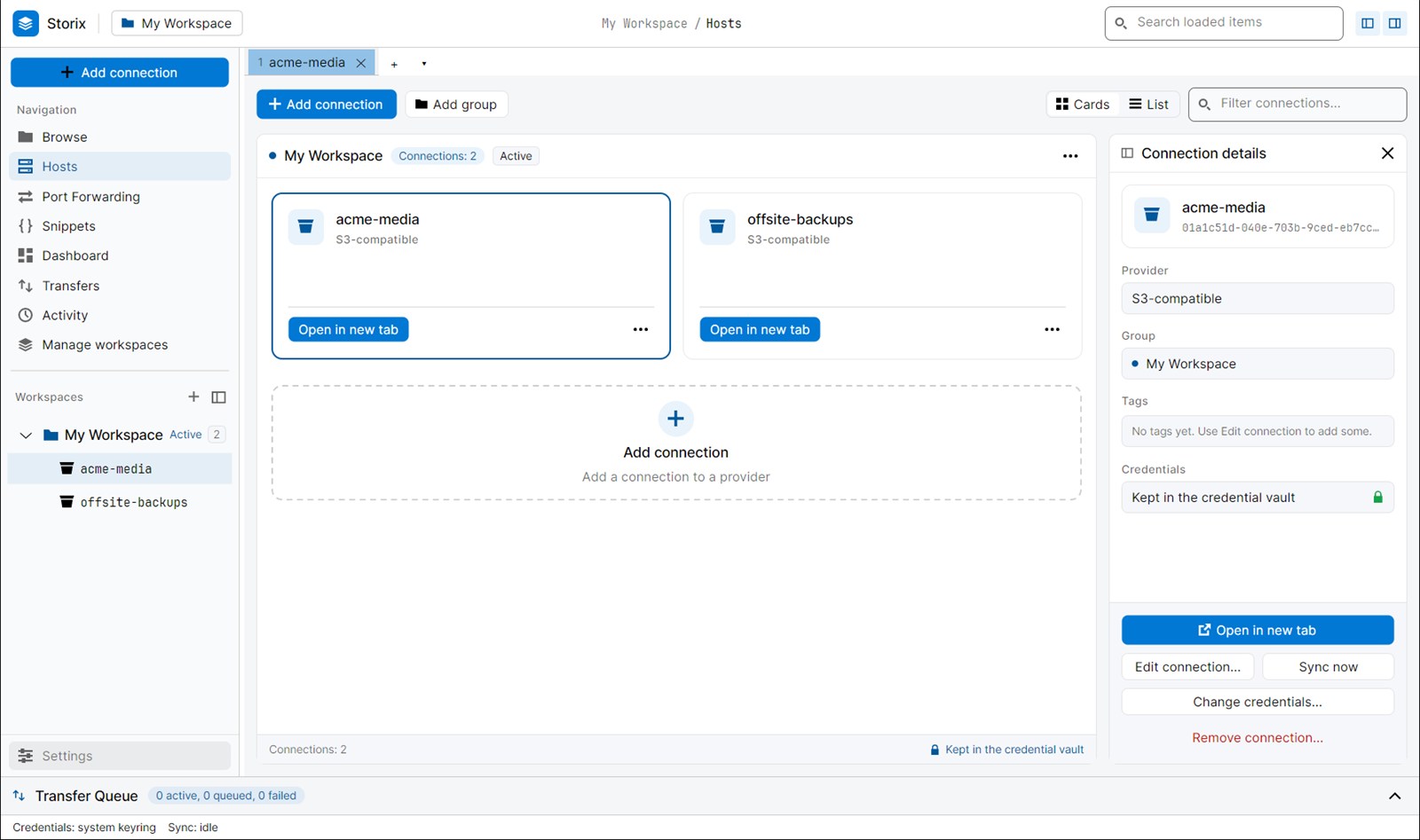
Every Connection at a glance.
Hosts shows the Connections in a Workspace as cards or a list. Pick one to see its details, open it in a new tab, sync it now or change its credentials without setting it up again.
- OrganiseGroups and tags, with a filter box for long lists
- VaultThe details panel shows that credentials are kept in the vault
Commands you'd otherwise retype.
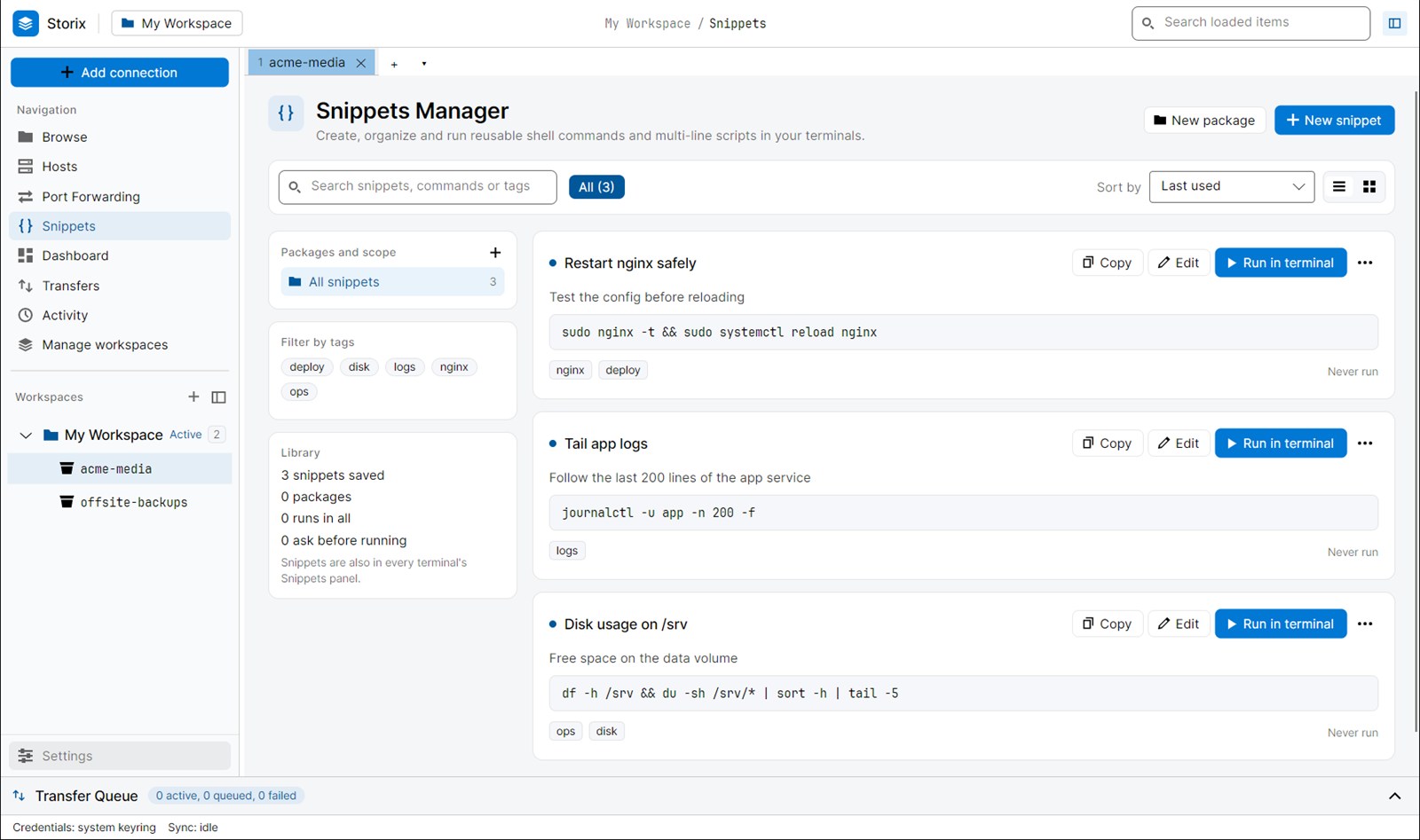
The Snippets Manager keeps shell commands and multi-line scripts with a description and tags. Copy one, or run it straight into an open SSH terminal. Mark risky ones to ask before running.
- FindSearch by name, command or tag; sort by last used
- GroupPackages for each project or server
Port forwarding
Local, remote and dynamic (SOCKS5) tunnels over your SSH Connections, with live session count and throughput.
Activity log
Uploads, deletions, conflicts, connection changes and errors in one searchable log, with credentials and tokens removed.
Sync with rules
Check for changes on a schedule, leave out files by pattern, and choose what happens to deletions, renames and two-sided edits.
Copy between providers
Drag from an S3 bucket onto an SFTP server. Same-provider copies run server-side when the provider allows it.
Share with your other devices
Pair another Storix installation on your network and share Connections or whole Workspaces with the permissions you choose. Your credentials never leave your computer. Using a shared Connection on the other device is coming in a later preview, followed by sharing from an always-on Windows or Linux server.
Make it yours
Light or dark, text size, font and accent colour, eight terminal colour schemes, and five languages.
Your keys stay in your keychain.
Credentials go into the operating system's own vault: Windows Credential Manager, macOS Keychain or the Linux Secret Service. Where none is available, Storix uses an AES-256-GCM encrypted file locked by your master password.
Telemetry is off by default. If you turn it on, it never includes file names, folder or bucket names, file contents or credentials. How Storix handles your data →
Questions people ask first.
Is Storix free?
Yes. The Free plan is free forever and includes 1 Workspace and 5 Connections, with every storage provider and feature. You don't need an account. Pro, Team and Enterprise plans add unlimited Workspaces and Connections, network sharing and support; see pricing.
Which operating systems does it run on?
Windows 11, current macOS releases on Apple silicon and Intel, and current Linux distributions such as Ubuntu 22.04 and 24.04, Fedora and Debian stable. Linux builds ship as AppImage, Flatpak and .deb. Features are the same on every platform.
Is there a mobile app?
Not yet. Storix for iOS and Android is coming soon, with cross-device sync so your Workspaces and Connections are available on your phone as well as your desktop.
Does Storix upload my files to its own servers?
No. Storix connects directly from your computer to your storage providers over TLS. There is no Storix cloud in between.
How is it different from rclone or the AWS CLI?
Storix is a graphical client. It gives you a file browser, a visible transfer queue with retry and resume, and a manual conflict prompt, across all your providers at once. Storix can also mount a Connection as a folder in your file manager, using a copy of rclone it includes.
What happens if my connection drops mid-upload?
The transfer stays in the queue. Storix retries with backoff when the provider is reachable again and resumes where the provider supports it. If it still fails, the item shows as Failed with Retry and Dismiss buttons. It is never removed silently.
I forgot my master password. Can you reset it?
No, and nobody else can either. When you set up the encrypted vault, Storix shows a one-time Recovery Key. That key, or your password, is the only way back in. This only applies when the OS vault isn't available.
Try it on your own buckets.
Free plan for Windows, macOS and Linux; iOS and Android coming soon. See pricing.